CueLab turns your multitrack stems into production-ready Ableton Live sets and Morningstar MC4 configs — automatically. Built for worship teams.
Free trial · No credit card · Runs locally on your Mac
Works with the tools you already use
CueLab turns your multitrack stems into production-ready Ableton Live sets and Morningstar MC4 configs — automatically. Built for worship teams.
Free trial · No credit card · Runs locally on your Mac
Works with the tools you already use
How it works
The whole pipeline — the parts that used to eat your Saturday night — runs in one pass.
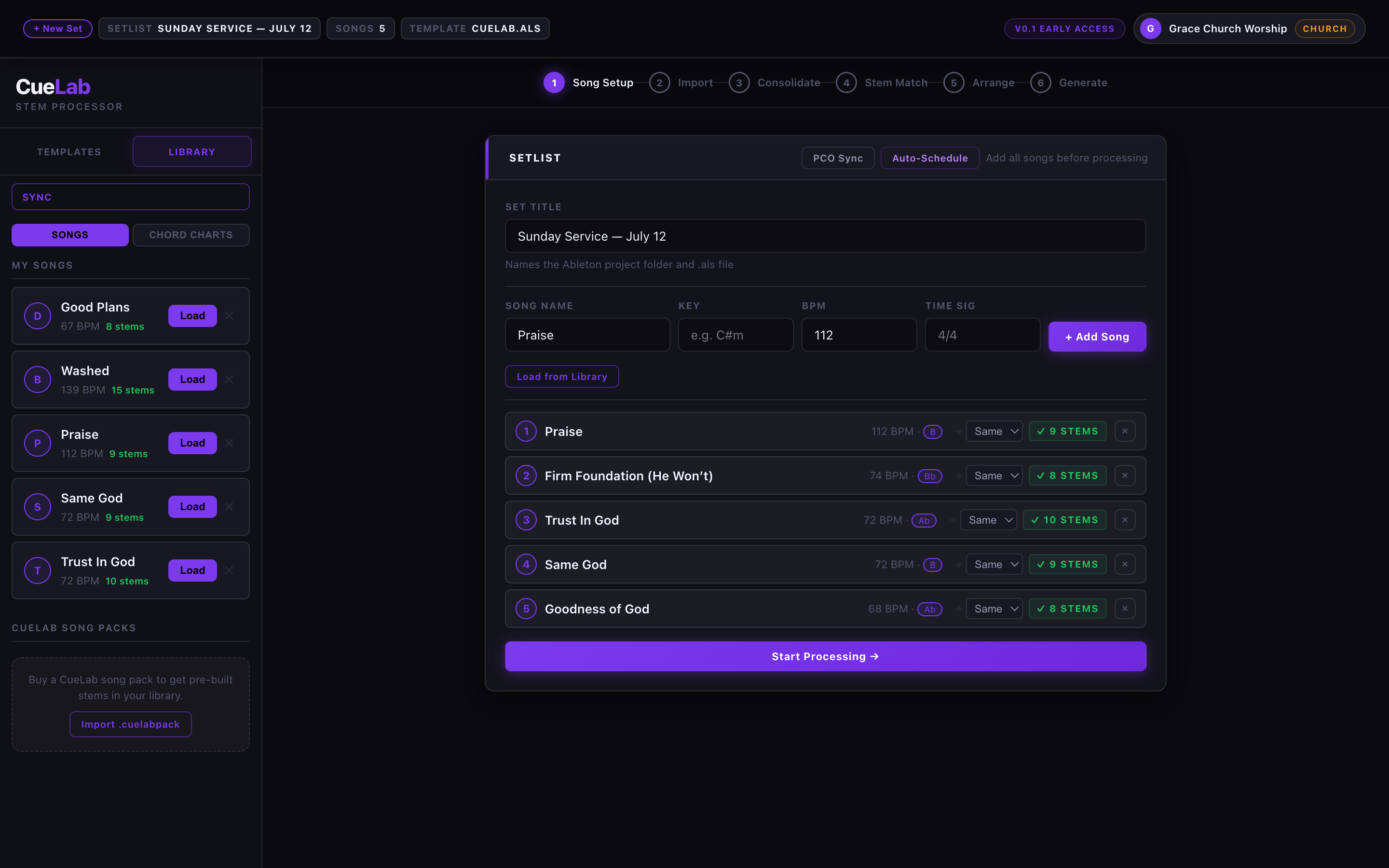
Enter your songs — name, key, BPM. Or pull this Sunday’s plan straight from Planning Center.
Drop in your MultiTracks zip or folder. CueLab auto-matches stems to the right Ableton tracks.
Bounce stems to WAV, dial in gain staging with per-song presets, and preview audio in the browser.
Review stem-to-track assignments. Transpose any song up to ±12 semitones without touching Ableton.
One click builds a production-ready .als file and your MC4 preset bank. Open in Ableton and mix.
Inside CueLab

Consolidated stems save per song. Next week, load them straight into a new set — keys, BPMs, and gain staging come along for free.

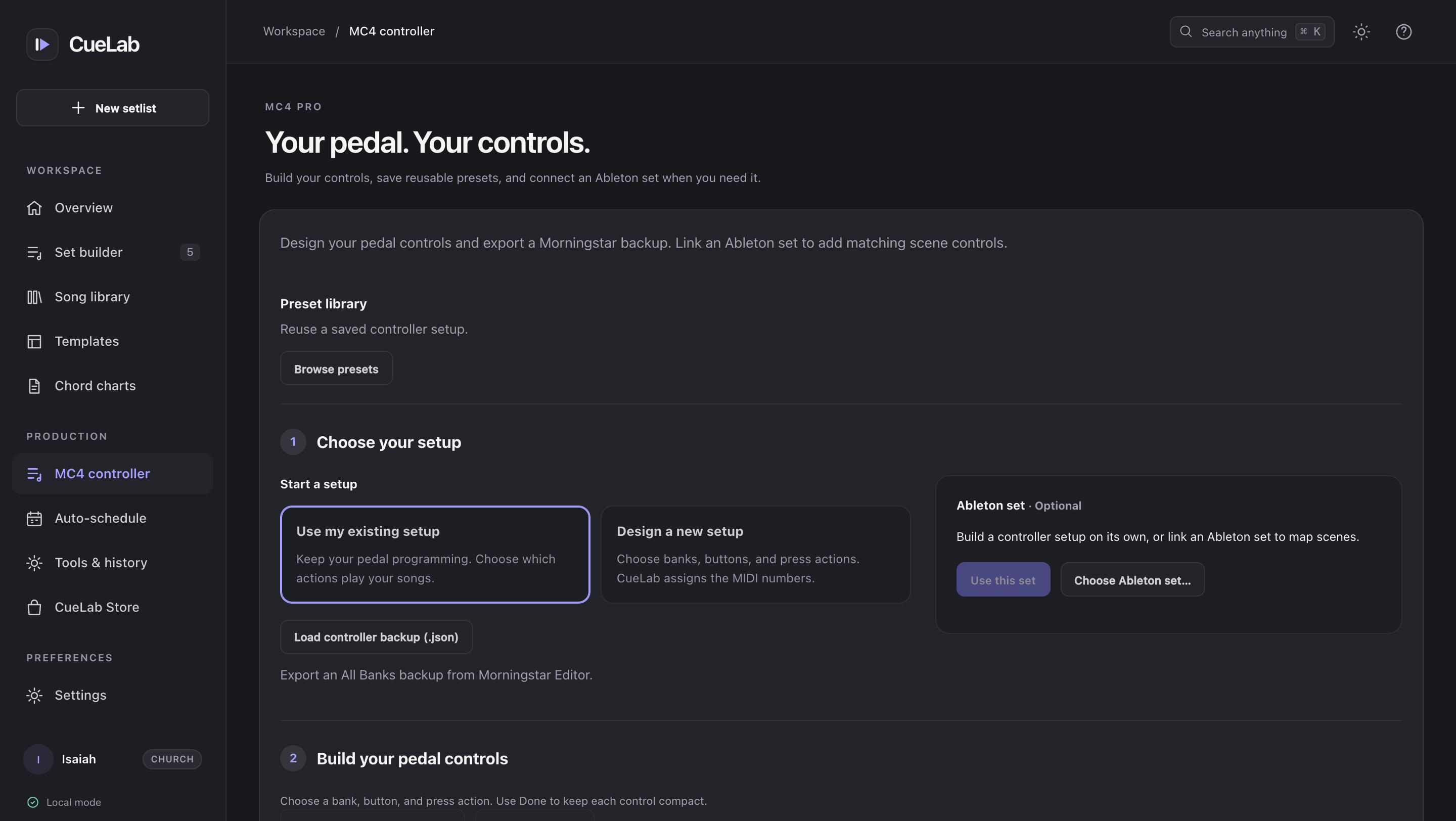
Design your MC4 layout, save reusable presets, and export a Morningstar backup — with scene controls mapped to the set you just built.
Features
From solo worship directors to full production teams — CueLab handles the tedious parts so you can focus on the music.
Build a Live set with the included template, or use your own custom template on Standard and above. Review the result, open Ableton, and rehearse.
Build a custom arrangement of any song — reorder, repeat, or drop sections to match exactly how your team plays it. Or mash up multiple songs, pulling sections from each into one seamless set, laid out on the Ableton timeline with section markers and BPM automation.
Build your MC4 layout right in the app — map buttons, save reusable presets, and export a ready-to-import Morningstar backup with scene controls already matched to the set you just generated.
Save consolidated stems per song. Load any track from your library into a new set — no re-importing required.
Save a volume profile for each song. When that song loads, CueLab recalls the preset automatically.
Pull this Sunday’s plan directly from PCO. Songs, keys, and BPMs populate your setlist in one click.
Import a chord chart PDF and edit it right in the app — fix chords, transpose to any key, and drop empty sections. Export a clean, printable chart or save it to your library.
With CueLab open and your Mac awake, schedule preparation from your Planning Center plan and save the generated set to your Mac.
CueLab Store
Pricing
Annual billing saves 30% — Starter from $13/mo.
Trial
$0
Try every feature free for 14 days.
Starter
$19/mo
Solo worship director, weekly sets.
Standard
Most popular$35/mo
Full workflow for production teams.
Church
$49/mo
Full automation for large churches.
Several campuses? Multisite starts at $79/mo for 2 campuses. See full plans & annual pricing →
FAQ
CueLab is a Mac app for worship teams that run tracks in Ableton Live. You build a setlist, drop in your multitrack stems, and CueLab matches each stem to the right track in your Ableton template and generates a ready-to-open Live set (.als) — plus a Morningstar MC4 preset bank for the same songs.
Yes. Drop in a MultiTracks.com zip or folder, or stems from your own library, and CueLab auto-matches them to your Ableton tracks.
Yes. On Standard, Church, and Multisite (and during the 14-day trial), CueLab pulls this Sunday's plan from Planning Center so songs, keys, and BPMs fill in your setlist in one click. Starter does not include Planning Center sync. On Church and Multisite, Sunday auto-schedule runs the whole pipeline from your PCO plan and drops the .als on your desktop automatically.
Yes. Build and export MC4 controller presets now on Standard, Church, and Multisite, or try them during the 14-day free trial. MC4 controller export is not included in Starter.
No. CueLab injects your stems into your own custom .als template, or into one of ours, with groups, sends, and scenes pre-named.
A Mac running macOS 12 (Monterey) or later on Apple Silicon (M1 or later), with at least 4 GB of RAM, and Ableton Live 10 or later. Intel Macs are not supported by the current download. CueLab runs locally on your Mac — internet is only needed for Planning Center sync and licensing.
There is a 14-day free trial with every feature unlocked and unlimited generations. No credit card is required. Paid plans are Starter at $19/month, Standard at $35/month, Church at $49/month, and Multisite at $79/month for 2 campuses and 5 computers, with annual billing saving about 30%.
Join worship teams using CueLab to run cleaner, faster production every week.
14 days free · All features included · No credit card required